Free and open source · Windows
Kosh
From papers to a manuscript, in one local workspace.
A free, open-source research desk for Windows. Import your papers, save highlights and notes that link back to the source page, and write with those sources beside your draft. Format citations and export to Word, PDF or LaTeX.
Current package: Release candidate 1.0.0-rc.1 · Kosh-1.0.0-rc.1-Setup.exe · AGPL-3.0-only
- Needs 64-bit Windows 11, Microsoft Edge and the .NET Framework. The document runtime is included, and installing does not need administrator rights.
- The installer is not code-signed, so Windows may show an unknown-publisher warning. Release details and SHA-256 checksums are linked below.
Source on GitHubRelease notesUser guideSHA-256 checksumsWatch the 32-second walkthrough
How it works
Import
Bring in PDF, Word and text files, along with Markdown, CSV, BibTeX and RIS. Kosh works on managed copies; your originals are left unchanged.
Read
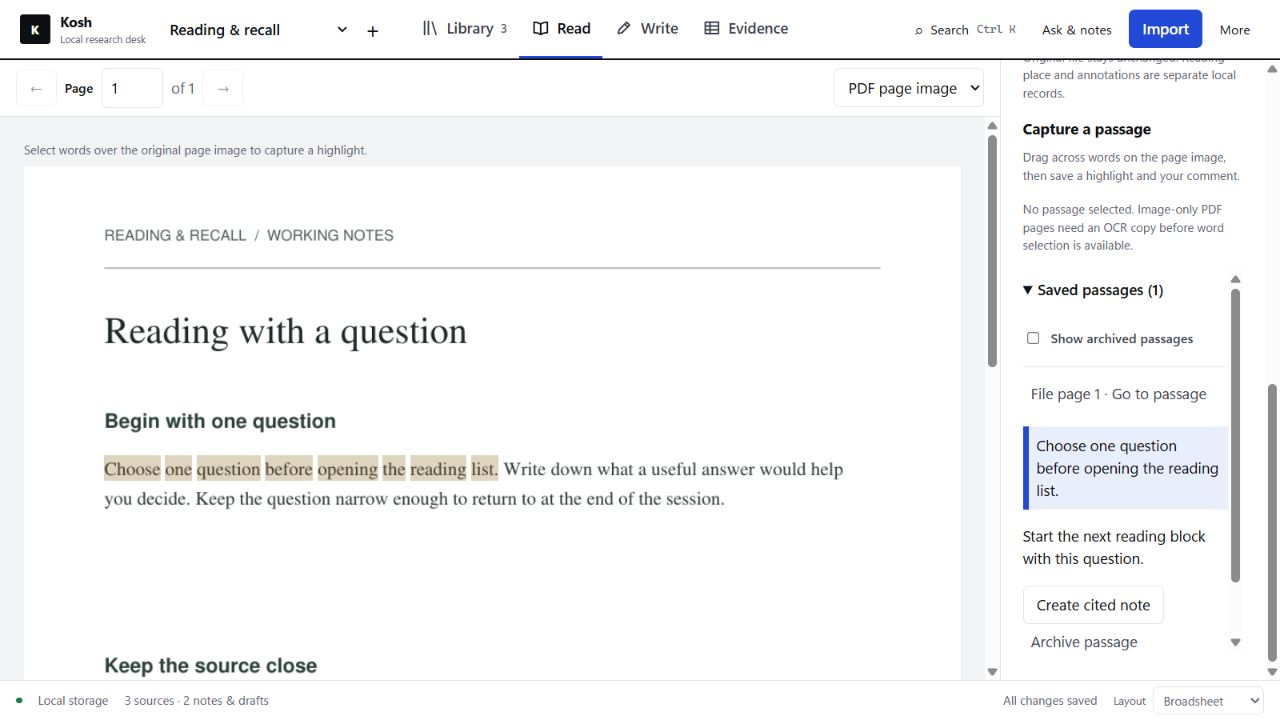
Read the actual PDF pages, select words, and save highlights and comments. Kosh remembers where you stopped.
Note
Notes and highlights stay linked to the passage they came from, so a line in your notes leads back to its page.
Draft
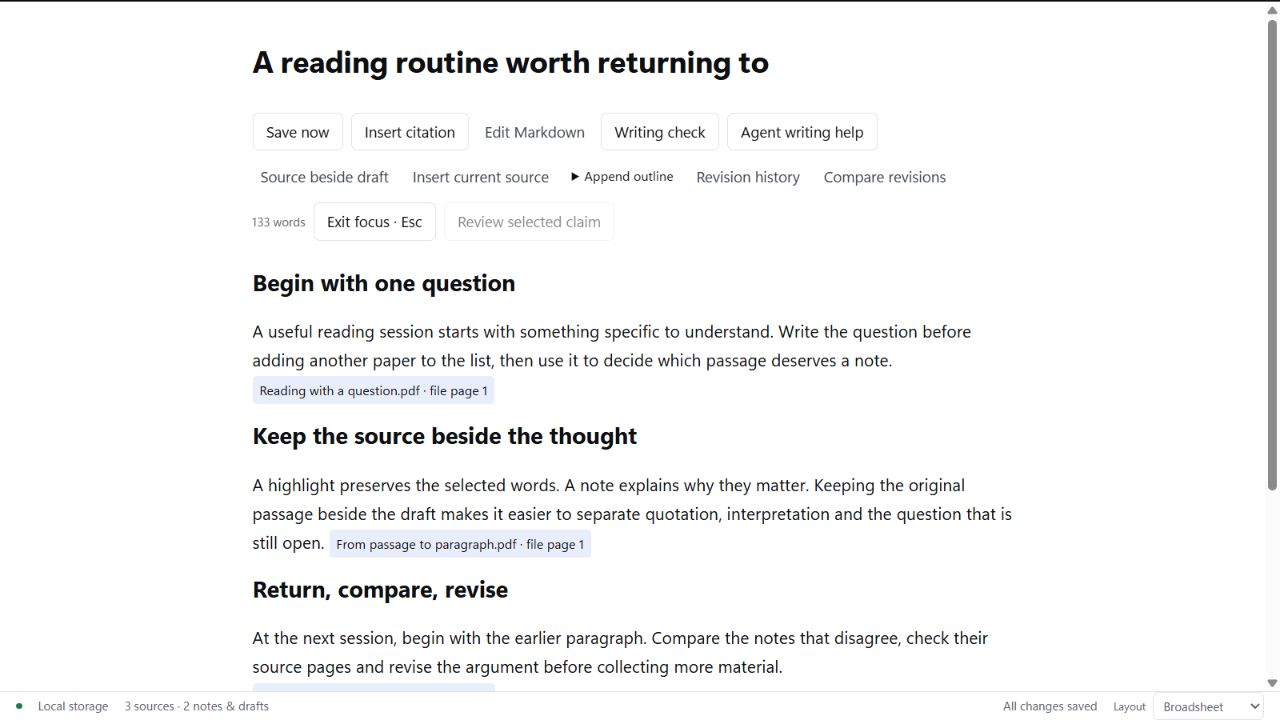
Write with your sources beside the draft and cite them in Vancouver/NLM, APA 7, IEEE or Chicago notes, or a CSL style you import. Saved history lets you compare one revision with another.
Export
Export to Word, PDF or LaTeX, among other formats. Check the metadata, the citations and the claims yourself before the manuscript goes anywhere.
Tools for the whole workflow
Find and organise
Search PubMed, Crossref, Europe PMC and OpenAlex when you need another source. Organise papers with tags, favourites and reading states. Create local OCR copies of scanned pages and review the recognised text.
Citations and manuscript formats
Use Vancouver/NLM, APA 7, IEEE, Chicago notes or an imported CSL style. Choose research article, review or case-report layouts. Export to Word, PDF or LaTeX, including editable native Word citations and locally compiled LaTeX PDFs.
Revisions and reviewer responses
Compare saved drafts, link reviewer comments to passages, keep your responses together and export a response letter. Project review identifies unresolved references, metadata gaps and outstanding recorded claim reviews.
Backup and portable sharing
Keep local backups, enable automatic backups while Kosh is open, or export a workspace ZIP to share. Restoring a workspace creates a separate copy. Local files and backup ZIPs are not encrypted.
Optional AI and agent controls
Use a local Ollama model or your own authenticated Codex or Claude CLI. Preview the selected content and review the proposal before applying it. Agents can use the CLI or 63 MCP tools; proposed changes to chosen text files require your review and approval.
Choose how you work
Choose Broadsheet, Stacks or Commonplace, in light or dark mode. Focus writing keeps the draft in view. Getting started, Help and optional hover explanations guide you through the controls.
First use
- Your library starts empty. Follow Getting started to create a workspace and import your first paper. Screenshots and the walkthrough use nonclinical example material.
- Begin with one paper you are free to use and that holds nothing sensitive. Take it through import, reading, a note and a short draft before you move a whole project in.
- Reading, writing, citations and export work without AI and without an account. There is no telemetry and no cloud sync; the library is stored on your computer.
- Backups are local and optional, and they are not encrypted.
What leaves your computer
- Online literature search across PubMed, Crossref, Europe PMC and OpenAlex sends only your search query, and only when you run it.
- AI assistance is optional. It can run through a local Ollama model. If you choose your own authenticated Codex or Claude command-line tool, approved content is sent to that provider; its CLI may also supply instructions or environment metadata. Provider access and charges are separate from Kosh.
- Citation metadata, OCR and generated text need your review. A recorded claim check reflects your judgement, not automatic scientific verification.
Built with assistance from OpenAI Codex and Anthropic Claude. Inspired by Beeblio by Al Harkan; no code or assets were copied, and there is no affiliation or endorsement. Full credits.